One of the most popular apps developed by Google, and one that was included on the first-generation iPhone, is Google Maps. Over the years Google has constantly added features and improved the app’s UI trying to improve the experience of using it. Google has now updated the icon for both the Android and iOS versions of its Maps app. The icon still shows a “pin,” but the design has been changed.
Google makes its Maps icon look more modern
The first thing you might notice about the new icon is the gradient Google colors that now blend into each other. The previous icon had individual boxes inside the “pin” diagonally situated. Each box was a different color (Blue, Green, Yellow, and Red). In addition, the new “pin” is not only larger but the circle inside it is larger as well. As a result, the top ring of the pin is much thinner.
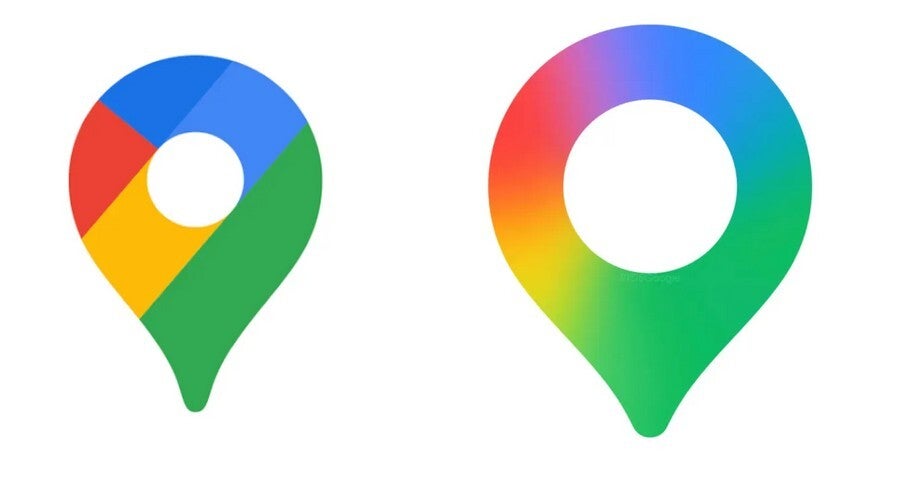
Old Google Maps icon is on the left, the new Google Maps icon is on the right. Image by 9to5Google
If you don’t have the new icon on iOS or Android, you can try to coax it out by doing this
But as it turned out, after checking my Pixel, I found that I had an uninstalled update for Google Maps. If you don’t have the new Google Maps icon on your phone, check for an update by following these directions:
- Open Google Play Store and tap your profile icon in the right corner.
- Press Manage apps & device and view “details”.
- Scroll down to see if you have an update for Google Maps, and if you do, tap on “Update.”
- Open the App Store and tap the profile icon in right corner.
- Press on Updates and scroll down to Google Maps. If there is an update for the latter, press on the Update button.
Weirdly enough, this did not work the first time I tried it. So when I returned to the Update page, I refreshed it and sure enough, a second Google Maps update appeared. I put the update through again, and this time it worked and the new icon appeared. So now I have the updated and more modern looking Google Maps icon on my daily driver (the Pixel 6 Pro) and my backup (iPhone 15 Pro Max).
Google once tried to use the Google Maps app to get more user data from Apple
Speaking of Google Maps, I first used the app in 2007 on my iPhone. Two years later I got to experience Google Maps with turn-by-turn directions on the Motorola Droid, the first phone to be equipped with Android 2.0. It seemed like magic at the time, and it was one of the initial selling points for the Droid and Android phones. It wasn’t until December 2012 that the iPhone finally added that feature.
Trending Products

Video Conference Lighting Kit, Ring...
15W LED Video Light Kit
Desk Ring Light for Zoom Meetings &...
SAMHOUSING Ipad Tripod Stand, with ...

LISEN Tablet Stand
LanPavilion iPad Stand, Adjustable ...

DJI Osmo Mobile SE, 3-Axis Phone Gi...
2pcs Original Joystick Parts for Zh...
hohem iSteady M7 Gimbal