Personally, I would’ve preferred at least to go back to stainless steel. The polished frames of iPhones 12 Pro through 14 Pro felt super sleek and cool, even if they were hard to keep clean. Stainless steel still has worse heat conduction properties than aluminum, but it is better at it than titanium. And, we didn’t get any chips and dents into the stainless steel frames as we do on the new iPhone 17 Pro aluminum bodies.
Plus, Apple also added a new vapor cooling chamber. That surely would’ve improved thermals, even if the body was stainless steel.
How does a vapor chamber help?
To be clear — that’s new for the iPhones, as Asus, Samsung and other Android manufacturers pioneered the tech, and it’s pretty ubiquitous in flagship smartphones nowadays.
A vapor cooling chamber works like this — the chamber component is filled with a tiny amount of liquid, which gathers around the area where the heat course is supposed to be. Once the processor starts to get hot, the liquid turns into vapor and moves away to cooler parts of the chamber. There, it touches the outer walls, releases the heat, and condenses back into liquid. In the iPhone’s case, the released heat is then moved on to the metal chassis for further dissipation.
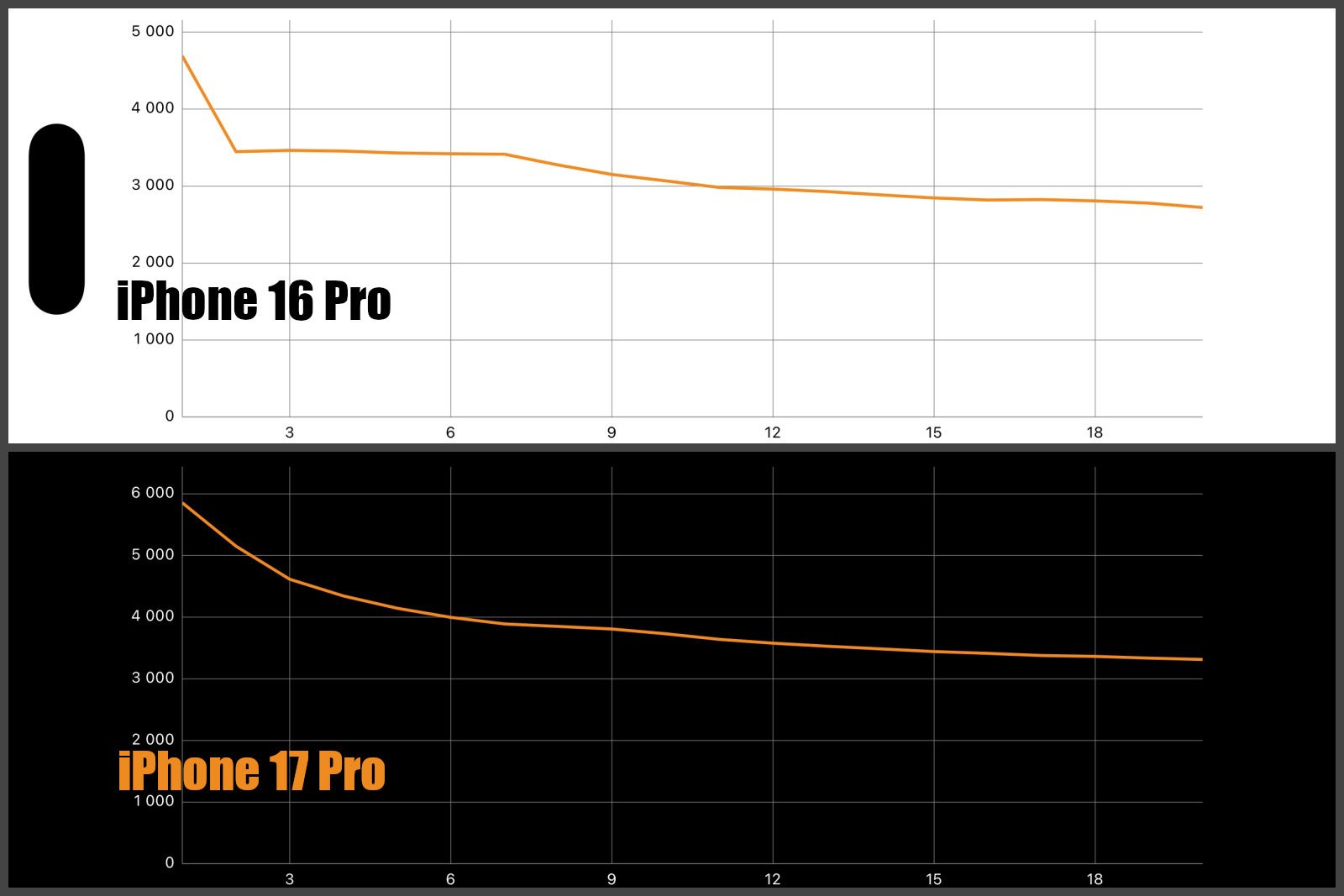
By cycle 3, the iPhone 16 Pro is already long settled in its low score groove, while the iPhone 17 Pro is still trying to push numbers
How much does the aluminum help, really?
Well, we took out ye olde FLIR camera and took a few photos of the iPhone 16 Pro and iPhone 17 Pro. First, we have a “baseline” idle picture — the two phones have been sitting at peace, for about 20 minutes, nobody has touched them:
Idle
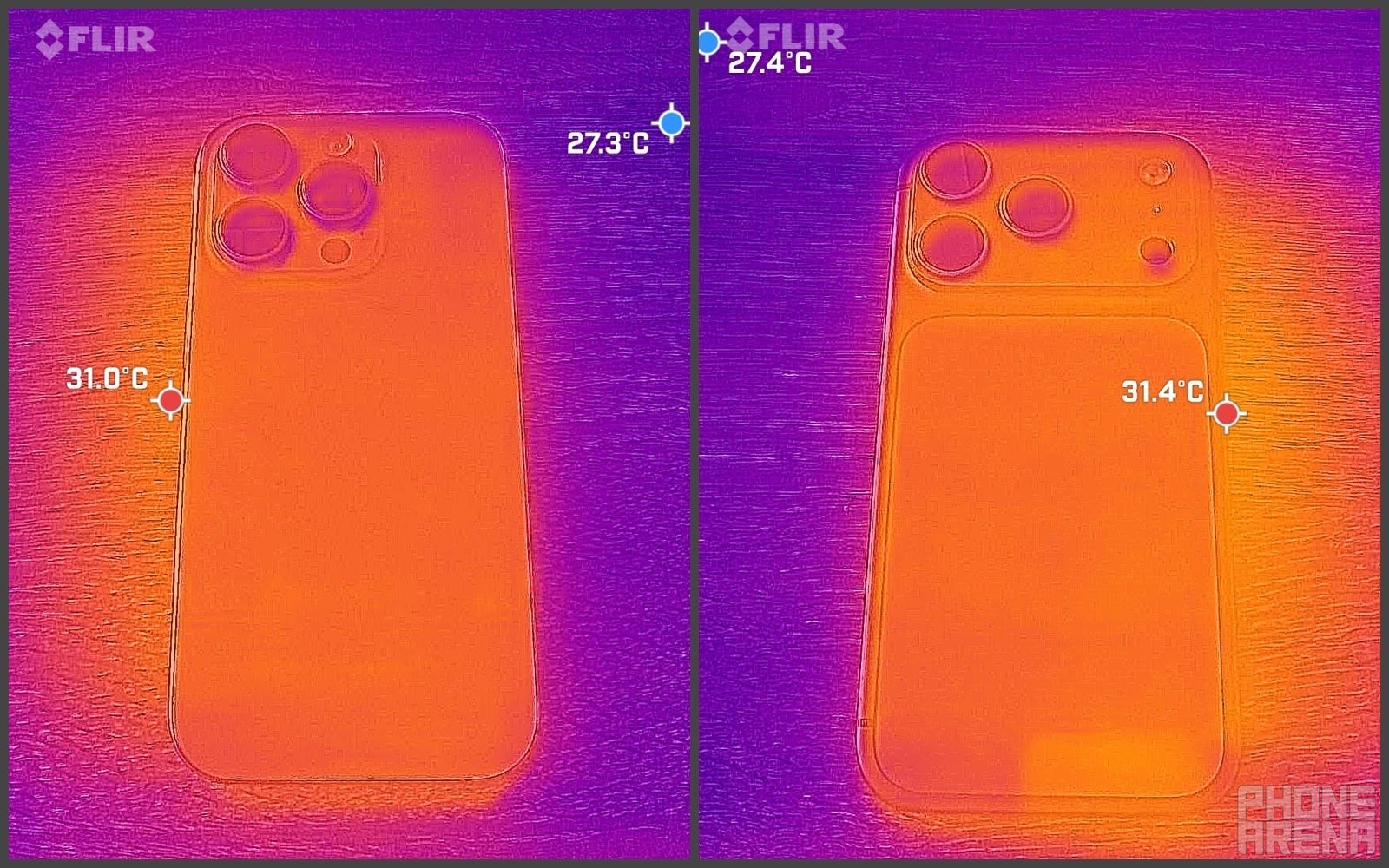
iPhone 16 Pro – idle | iPhone 17 Pro – idle (Image credit – PhoneArena)
Then, we booted up the 3DMark Wildlife Extreme Stress Test, and we let it run for a while. After 3 minutes, we started checking up on them with a FLIR One camera. Our model has a tolerance of ±3°C, so this is more about seeing temperature variations and following how the two phones manage it than getting absolute accurate temperature readings.
3 minutes in
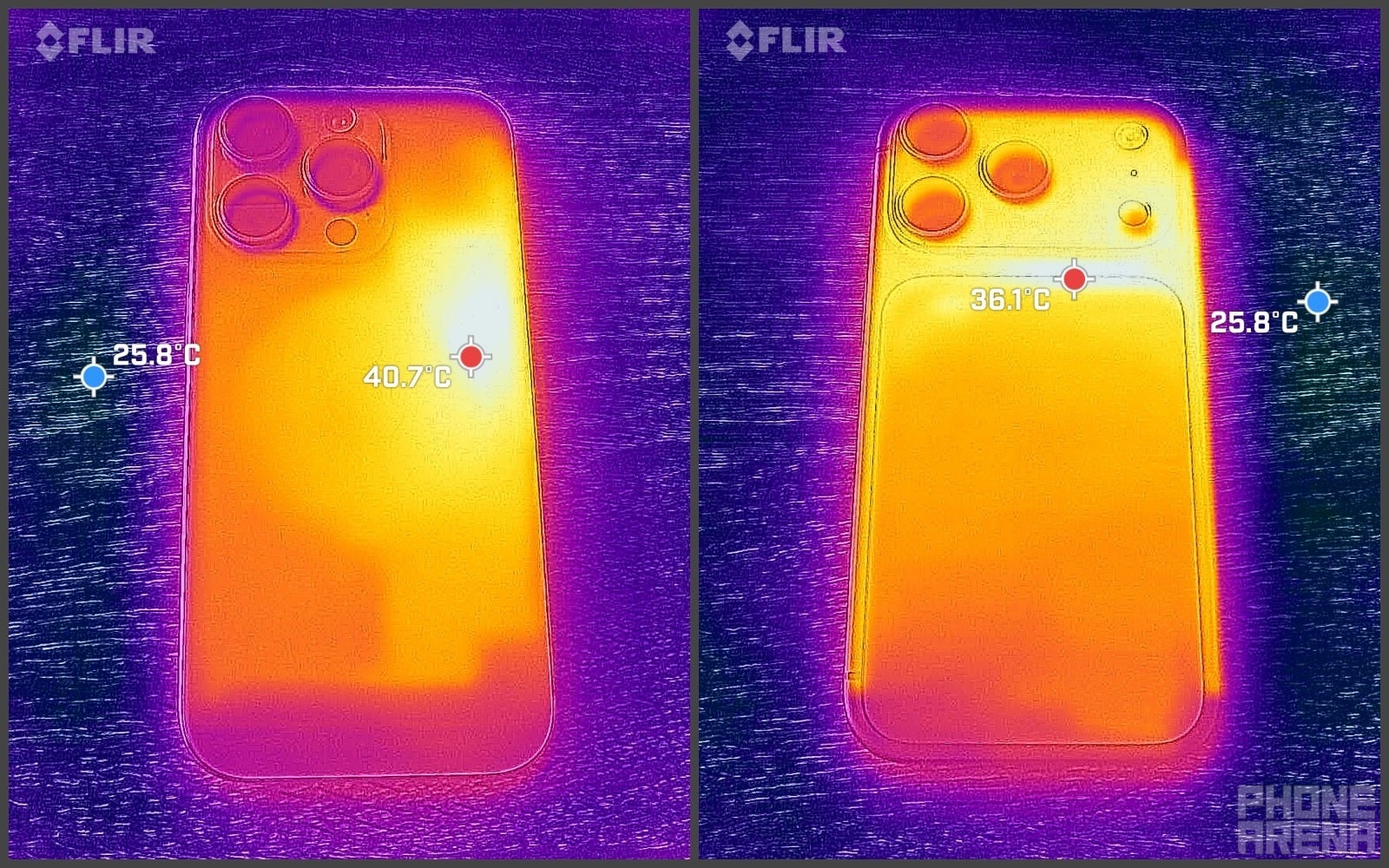
iPhone 16 Pro – 3 minutes in | iPhone 17 Pro – 3 minutes in (Image credit – PhoneArena)
You can clearly see that the iPhone 16 Pro‘s max temperature spot is pretty concentrated to the right, close to the volume keys. It’s at about ~41°C (~314°K) at this point, which is not super-hot, but definitely more than “warm”. And the titanium isn’t doing a whole lot of work in spreading this spot of heat around.
10 minutes in
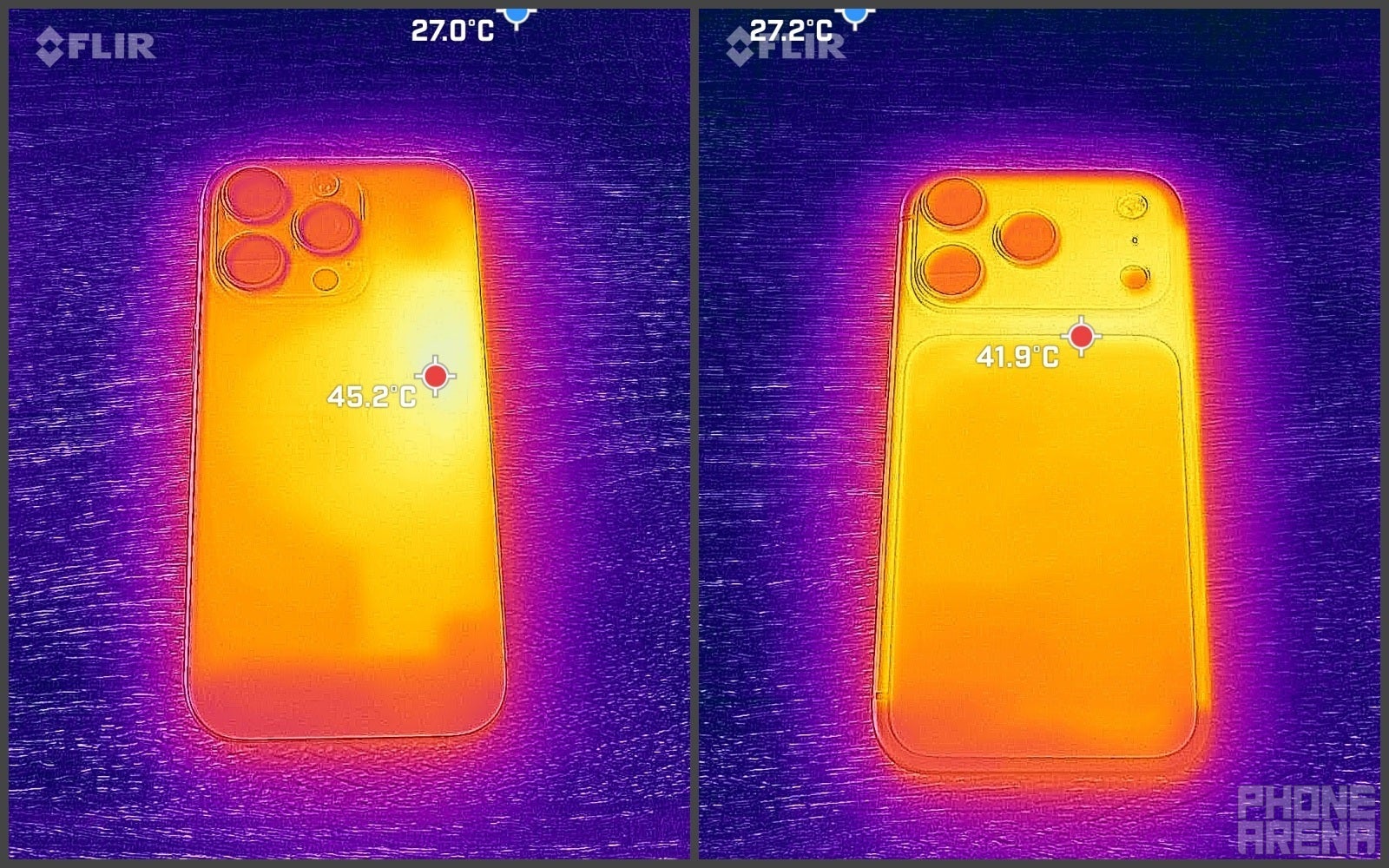
iPhone 16 Pro – 10 minutes in | iPhone 17 Pro – 10 minutes in (Image credit – PhoneArena)
10 minutes after the stress test has begun, there is little difference in the heat dissipation. The titanium iPhone 16 Pro still has all of that temperature concentrated in one spot, and it’s now up at ~45°C (~319°K). It’s typically uncomfortable to hold objects that are at this temperature, but since the iPhone’s hot spot is in this one area, and not over the entire frame, you will naturally adjust your grip and generally be OK.
The iPhone 16 Pro photo shows that the aluminum body is working hard at spreading the heat around. It’s top temperature spot is now at ~42°C (~315°K) — just slightly warmer than what the iPhone 17 Pro got just 3 minutes in. The entire frame glows bright, showing that the phone will actually feel a little warmer where you are holding it, but it’s in fact a better spread-out of the temperature, instead of focusing on (and stressing) just one part of the internal components.
So, we stopped the tests and checked out how fast these will cool down.
5 minutes of standby
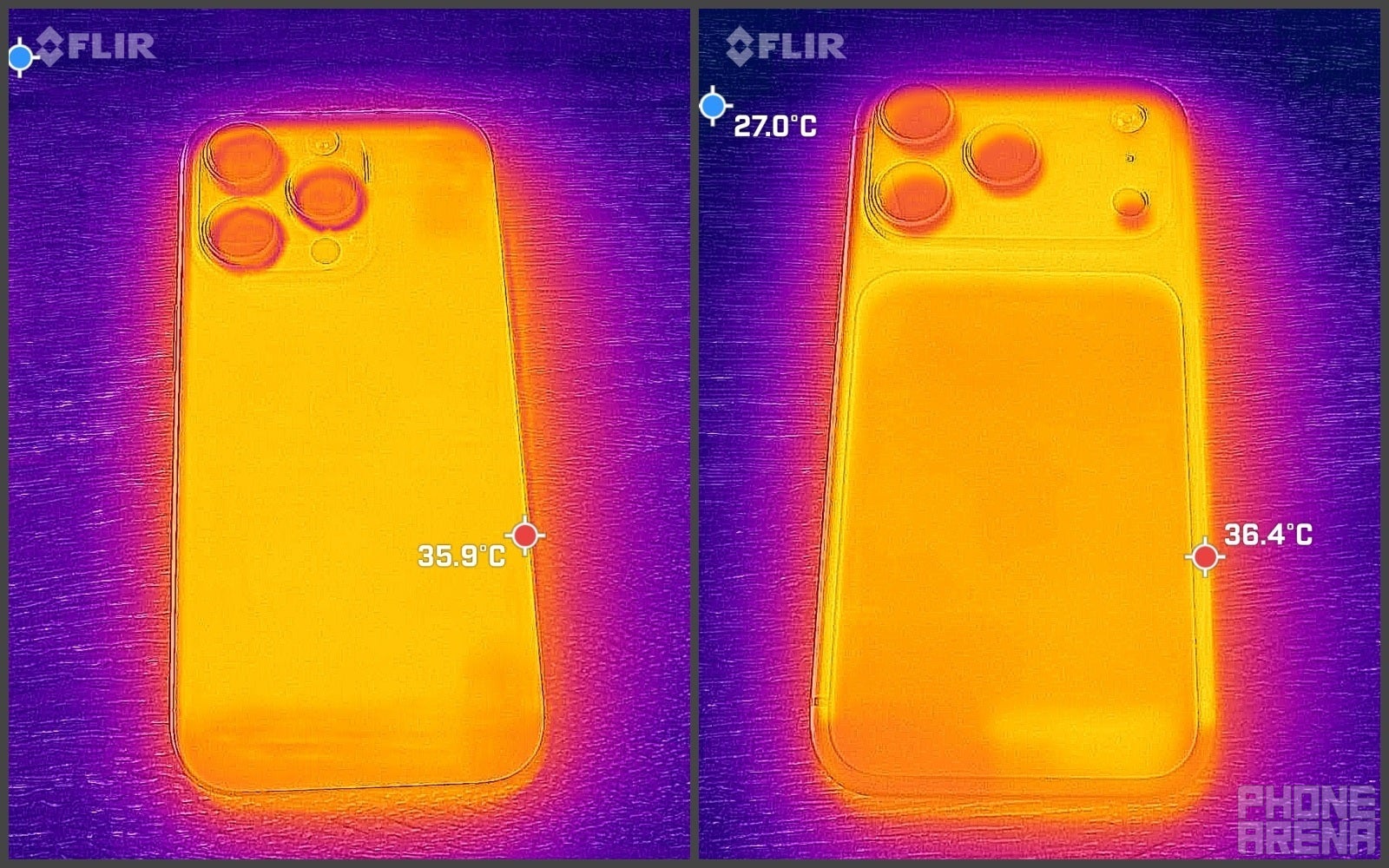
iPhone 16 Pro – 5 minutes of idling | iPhone 17 Pro – 5 minutes of idling (Image credit – PhoneArena)
Contrary to our expectations at this point, the titanium iPhone 16 Pro was pretty quick to cool down after we stopped the stress test. Within 5 minutes, the phone was about equally warm all over, and its top temperature spot was reading ~36°C (~309°K). Not quite our idling baseline, but getting there. The iPhone 17 Pro looks just about the same, also hovering around the same temperature.
Just to be sure, we checked back at 10 minutes after turning the test off:
10 minutes of standby
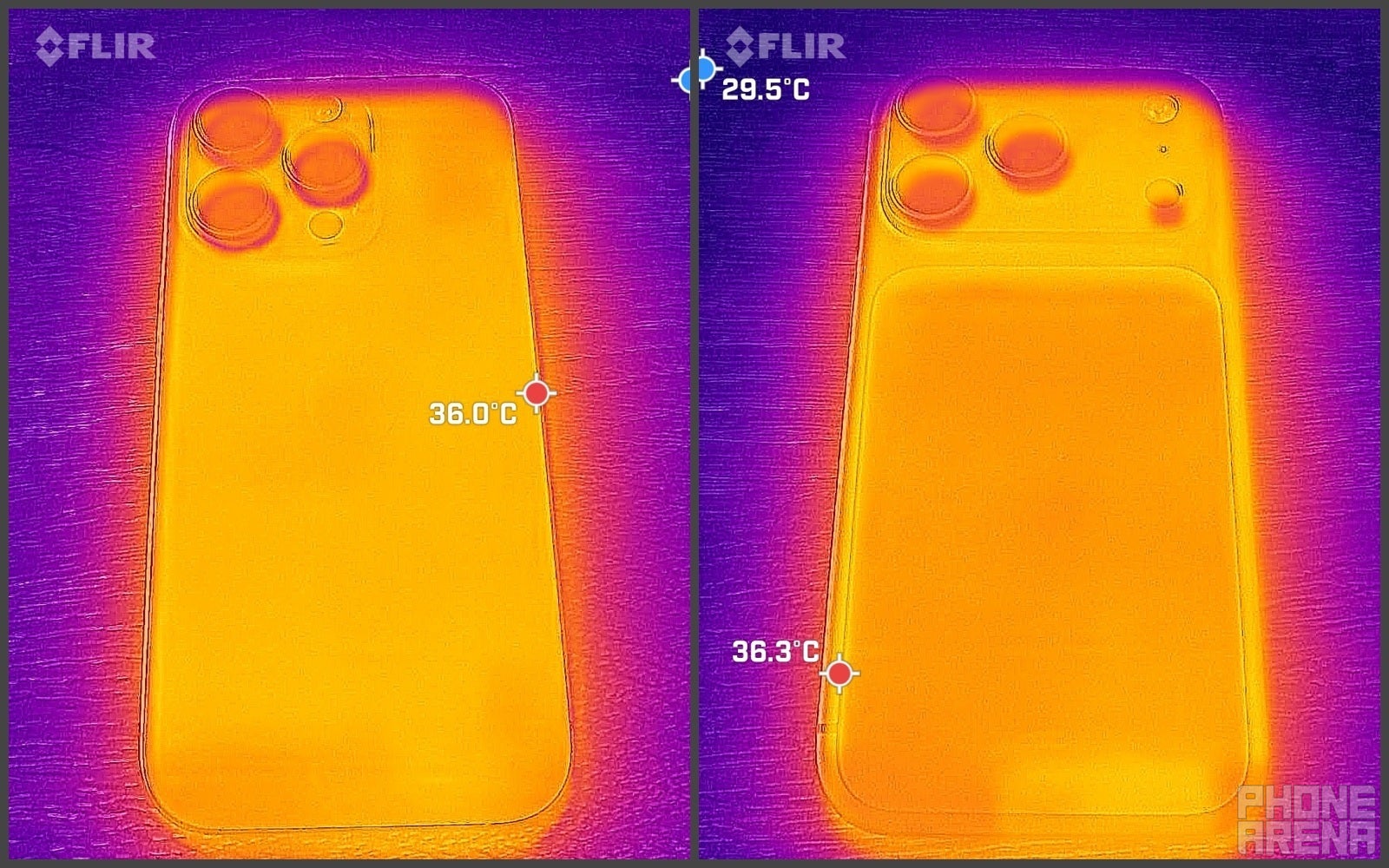
iPhone 16 Pro – 10 minutes of idling | iPhone 17 Pro – 10 minutes of idling (Image credit – PhoneArena)
After 10 minutes, there isn’t much difference. Neither of these phones is fully cooled-down, but none of them looks to be cooler than the other, too.
So, ultimately, the aluminum build does make a difference while actively using your iPhone. During heavy tasks, you will certainly feel the frame get warmer, but the iPhone 17 Pro will not have so much heat stress in one area of the body. Whereas, the iPhone 16 Pro does feel like it “needs a rest” after you use it a bit too much.
However, once you put them in standby — they cool down more or less the same.
Trending Products

Video Conference Lighting Kit, Ring...

15W LED Video Light Kit

Desk Ring Light for Zoom Meetings &...

SAMHOUSING Ipad Tripod Stand, with ...

LISEN Tablet Stand
LanPavilion iPad Stand, Adjustable ...

DJI Osmo Mobile SE, 3-Axis Phone Gi...
2pcs Original Joystick Parts for Zh...

hohem iSteady M7 Gimbal